
When cross-posting to multiple platforms, the single safest default export is 4:5 portrait at 1080×1350 px. It performs well on Instagram and Facebook feeds, displays without cropping on most mobile screens, and can be trimmed to 1:1 square in seconds. For vertical video, export at 9:16 (1080×1920 px) first, then derive your feed and square variants from that master. According to Buffer's 2026 guide, 1080 px width remains the safe baseline for feed images, and vertical ratios like 4:5 and 9:16 now tend to outperform square images on most networks.
The six ratios that cover roughly 95% of social use cases are: 9:16, 4:5, 1:1, 16:9, 2:3, and 1.91:1. Here is when to reach for each:
- 9:16 — Instagram Stories, Reels, TikTok videos, YouTube Shorts, Snapchat; fills the full mobile screen
- 4:5 — Instagram and Facebook portrait feed posts; the best single ratio for mobile feed engagement
- 1:1 — Square cross-posting when you need one file to work across multiple feeds without cropping
- 16:9 — YouTube standard uploads, LinkedIn video, Facebook landscape posts and banners
- 2:3 — Pinterest product and idea pins; maximises vertical discovery space
- 1.91:1 — Link preview cards on Facebook, X, and LinkedIn (typically 1200×630 px)
Key takeaways
Vertical-first exports at 1080 px wide are the single most effective change you can make to your social media image workflow in 2026.
| Point | Details |
|---|---|
| Start with a 9:16 master | Export at 1080×1920 px first, then crop to 4:5 and 1:1 variants from that master file. |
| 1080 px width is the baseline | All feed images should be at least 1080 px wide; uploading below this forces platform upscaling and softens the image. |
| Six ratios cover 95% of use cases | 9:16, 4:5, 1:1, 16:9, 2:3, and 1.91:1 address the vast majority of placements across all major platforms. |
| Always re-export, never resize at upload | Scaling at upload causes edge blur from platform re-encoding; re-export from your original editing timeline at the target dimensions. |
| Readysetsoldmedia delivers platform-ready exports | Every listing package includes MLS-ready and social-ready files sized for Instagram, Facebook, TikTok, and YouTube. |
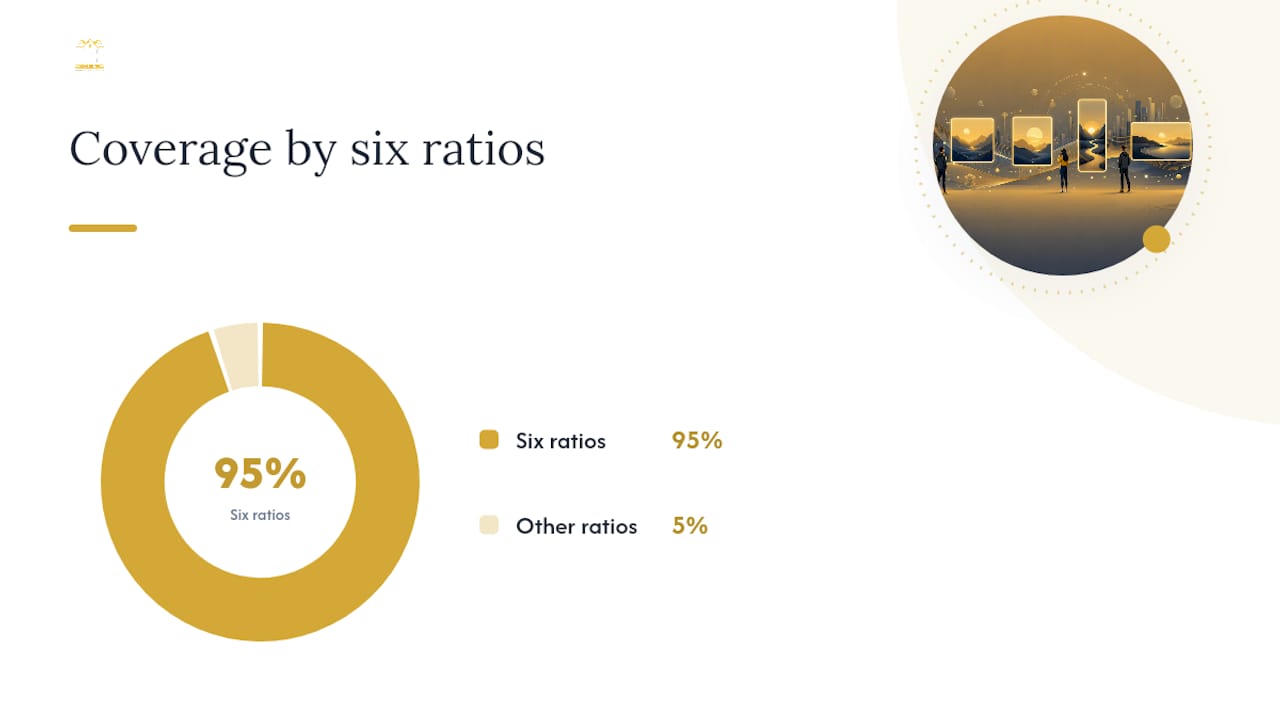
Table of Contents
- What are the right social media aspect ratios for every platform?
- Instagram specs: feed, carousels, Reels, Stories and profile
- Facebook specs: feed, Stories, cover and link previews
- X (Twitter) specs: feed images, header and link previews
- TikTok specs: vertical video, images and thumbnails
- YouTube specs: uploads, channel art, thumbnails and Shorts
- LinkedIn, Pinterest, Snapchat, Threads and Bluesky specs
- What video encoding settings should you use for social uploads?
- How do you pick the right aspect ratio for each goal?
- How to export correctly: a checklist for Photoshop, Premiere, Canva and mobile apps
- Real estate listing photos and social videos: a workflow for Canadian realtors
- Why vertical-first formats are the only rational choice in 2026
- Platform-ready listing media from Readysetsoldmedia
- Sources
What are the right social media aspect ratios for every platform?
The table below gives you a single-glance reference for the most common placements. All pixel dimensions assume a 1080 px width baseline unless noted. Export images as JPG or PNG in sRGB colour profile; export video as MP4 (H.264) unless the platform explicitly accepts H.265.
Official spec links for verification:
- Facebook Business placements guide
- Buffer 2026 social image sizes
- Iconosquare 2026 guide
- Riverside TikTok video size guide
Universal defaults to keep in mind:
- Minimum 1080 px wide for all feed images
- sRGB colour profile for all exports (not Adobe RGB or Display P3)
- JPG for photos, PNG for graphics with transparency, MP4 (H.264) for video
- Keep file sizes under 8 MB for images and under 4 GB for video (platform maximums vary)
Last updated: 2026. Check each platform's official help centre for breaking spec changes.
Instagram specs: feed, carousels, Reels, Stories and profile
Instagram is the platform where getting your dimensions exactly right pays off most visibly. A slightly wrong crop on a Reel thumbnail shows up on every profile grid visit.
Feed posts and carousels:
- Portrait (recommended): 1080×1350 px, 4:5 — takes up the most vertical screen space in the feed
- Square: 1080×1080 px, 1:1 — safe for cross-posting but takes up less feed real estate
- Landscape: 1080×566 px, 1.91:1 — avoid for feed; it shrinks on mobile and underperforms
Stories and Reels:
- Full-screen vertical: 1080×1920 px, 9:16
- Iconosquare's 2026 guide notes that Reels thumbnails are cropped to roughly 4:5 or 3:4 when they appear in the profile grid and in the Explore feed, so your main subject should sit in the central 1080×1350 px zone of your 1080×1920 master
Safe-area guidance for Reels: Keep all text, logos, and faces within a central 1080×1420 px zone (leaving roughly 250 px clear at the top and 330 px at the bottom). Instagram overlays the username, caption, and action buttons in those margins. For profile grid previews, the safe zone tightens further to the central 1080×1350 px.
Profile photo: Upload at 320×320 px minimum, displayed as a circle. Keep your subject centred with generous padding around the edges.
Pro Tip: Export your Reel at 1080×1920 px, then use the same file to generate your feed thumbnail by cropping the central 1080×1350 px region. You preserve the composition without re-rendering, and both assets come from one master export.
Facebook specs: feed, Stories, cover and link previews
Facebook serves content across a wider range of devices than Instagram, which means the same image can look quite different on a desktop browser versus a mobile feed. The platform accepts most common ratios but will crop anything outside its preferred range.
Feed images:
- Portrait: 1080×1350 px, 4:5 — Facebook crops taller images to 4:5 in the feed automatically
- Square: 1080×1080 px, 1:1
- Landscape: 1200×630 px, 1.91:1 — standard for shared link previews and boosted posts
Cover photo: Upload at 820×312 px for desktop display; on mobile, Facebook crops to approximately 640×360 px from the centre. Keep all critical content (text, logo) within the central 640×312 px zone to stay safe on both. Facebook Business's placement guidance recommends leaving safe-area margins on Stories and cover images to prevent UI elements from covering key content.
Stories: 1080×1920 px, 9:16 — same spec as Instagram Stories, which makes cross-posting straightforward.
Link preview cards: 1200×630 px, 1.91:1 — this is the standard link-preview ratio used across Facebook, X, and LinkedIn. Set this in your Open Graph meta tags to control how shared URLs appear.
Profile photo: 170×170 px on desktop, displayed as a circle. Upload at 400×400 px or larger for sharpness.
Cross-posting from Instagram to Facebook: A 4:5 portrait image created for Instagram will display correctly in the Facebook feed without any re-cropping. Stories at 9:16 transfer without modification. Where you will run into trouble is with square 1:1 posts, which Facebook may add white padding to on desktop — not a problem for most feeds, but worth checking before a paid campaign.
Facebook's delivery system may reduce reach on image ads with heavy text overlays, even though the hard restriction was removed.*
X (Twitter) specs: feed images, header and link previews
X displays images differently depending on whether a user is on mobile or desktop, and the timeline crop can cut off focal points if you are not careful.
Profile and header:
- Profile photo: 400×400 px, 1:1 — displayed as a circle; upload at 400×400 px minimum
- Header image: 1500×500 px, 3:1 — keep all important content in the central 1260×420 px zone, as X crops the edges on smaller screens
In-feed images:
- Single image: 1200×675 px, 16:9 or 1080×1080 px, 1:1 — X displays a single image in a 16:9 crop by default in the timeline; if you upload a 1:1 image, X shows it with slight letterboxing on desktop
- Two images: each displays at approximately 1:1 side by side
- Three or four images: X uses a mixed grid; keep subjects centred in each frame
Link preview: 1200×630 px, 1.91:1 — same as Facebook and LinkedIn. X uses the twitter:image Open Graph tag to pull this image; without it, X may select an arbitrary image from the page.
Mobile crop note: X's timeline crops single images to a 16:9 preview on mobile. If your focal point is near the top or bottom of a taller image, it will be cut off until the user taps to expand. Compose with the subject in the centre third of the frame.
File format and size: JPG or PNG under 5 MB for images; GIF under 15 MB. PNG is preferred for graphics with text because it avoids JPG compression artefacts on sharp edges.
TikTok specs: vertical video, images and thumbnails
TikTok is built around one ratio. Everything else is a compromise.
Video:
- Primary: 9:16 at 1080×1920 px — TikTok's recommended upload ratio; any other ratio will be letterboxed or pillarboxed and will not fill the screen
- Alternative 4:5 uploads may display but leave black bars on the sides; they will not perform as well in the For You feed
Profile photo: 200×200 px minimum, 1:1 — displayed as a circle
Thumbnails: TikTok auto-generates a thumbnail from your video, but you can upload a custom cover image at 1080×1920 px, 9:16. A strong custom thumbnail improves click-through from profile pages and search results.
Image posts and carousels: TikTok's image carousel feature also uses 9:16 as the preferred ratio. A 4:5 image will display with padding.
Safe-area guidance:
- Top 130 px: reserved for the TikTok UI bar
- Bottom 250 px: reserved for the caption, username, and action buttons
- Left 60 px: reserved for the side action panel (likes, comments, share)
- Keep all critical text and faces within the central 960×1540 px zone
Pro Tip: Shoot and export your TikTok content at 1080×1920 px from the start. Cropping a 16:9 landscape video to 9:16 in post almost always cuts off the subject — the composition was never designed for vertical. Plan vertical from the first frame.
YouTube specs: uploads, channel art, thumbnails and Shorts
YouTube is the one major platform still firmly landscape-first for standard content, though Shorts has shifted that for short-form.
Standard uploads: 16:9 at 1920×1080 px — YouTube will accept other ratios but adds black bars to fill the 16:9 player. Upload at 1080p minimum; 4K (3840×2160) is accepted and future-proofs your content.
Thumbnails: 1280×720 px, 16:9 — minimum width of 640 px, but 1280×720 is the standard. Thumbnails are one of the highest-impact elements for click-through rate; keep text large, faces prominent, and contrast high.
YouTube Shorts: 9:16 at 1080×1920 px — identical to TikTok and Instagram Reels. Shorts are displayed in a vertical player; a 16:9 video uploaded as a Short will be heavily letterboxed.
Channel art safe zones:
| Zone | Dimensions | Visible on |
|---|---|---|
| Full canvas | 2560×1440 px | TV screens |
| Safe zone (text/logo) | 1546×423 px (centred) | All devices |
| Mobile crop | 1546×423 px | Mobile |
| Desktop display | 2560×423 px | Desktop browser |
Upload channel art at the full 2560×1440 px canvas. Place all logos, channel names, and key graphics within the central 1546×423 px safe zone. Content outside that zone will be cropped on mobile and tablet.
Export guidance:
- Standard video: H.264, MP4, 1920×1080, 8–12 Mbps for 1080p
- Shorts: same codec and container, 1080×1920 px
- Thumbnails: JPG or PNG under 2 MB
For listing video previews on YouTube, export your 16:9 cinematic walkthrough as the main upload and create a separate 9:16 Shorts cut from the most visually striking 60 seconds.
LinkedIn, Pinterest, Snapchat, Threads and Bluesky specs
LinkedIn:
| Placement | Ratio | Dimensions |
|---|---|---|
| Profile photo | 1:1 | 400×400 px |
| Cover photo | ~4:1 | 1584×396 px |
| Feed image post | 1.91:1 | 1200×630 px |
| Company logo | 1:1 | 300×300 px |
| Video post | 16:9 or 1:1 | 1920×1080 or 1080×1080 |
LinkedIn's feed favours landscape and square images for professional content. Vertical 4:5 posts are accepted but display with more white space on desktop. For discovery and reach, 1.91:1 landscape tends to perform better on LinkedIn than on Instagram.
Pinterest: The platform is built for vertical discovery. Use 2:3 at 1000×1500 px for standard pins; Buffer's 2026 guide confirms this as the preferred ratio for product and idea pins. Square 1:1 pins are accepted but take up less feed space and tend to see lower engagement. Avoid anything wider than 1:1 — Pinterest will crop it aggressively.
Snapchat: Stories and Spotlight content use 9:16 at 1080×1920 px, identical to Instagram Stories. Keep all key content within the central safe zone (top and bottom 250 px reserved for UI). Snapchat ads follow the same spec.
Threads: Threads (Meta) displays feed images at up to 1:1 square or 4:5 portrait. The platform currently mirrors Instagram's image handling. Link previews pull from Open Graph tags at 1.91:1 (1200×630 px). Profile photos display at 1:1, recommended at 400×400 px minimum.
Bluesky: Bluesky supports feed images at 1:1, 4:5, and 16:9. Profile avatars display at 1:1 (recommended 400×400 px); header/banner images display at approximately 3:1 (1500×500 px). The platform is still evolving its image-handling behaviour, so check the official Bluesky documentation for the latest constraints before publishing at scale.
What video encoding settings should you use for social uploads?
Getting the aspect ratio right is only half the job. If you export at the wrong bitrate or codec, the platform's re-encoder will do it for you, usually with visible quality loss.
Recommended codec and container:
- H.264 in MP4 — accepted by every major platform; the safest default
- H.265 (HEVC) in MP4 or MOV — accepted by YouTube and some newer TikTok uploads; produces smaller files at equivalent quality, but not universally supported for direct upload
Bitrate guidance for 1080p:
- Instagram Reels / Stories: 3,500–5,000 kbps video, 128 kbps AAC audio
- TikTok: 2,500–4,000 kbps video
- YouTube 1080p: 8,000–12,000 kbps video (YouTube re-encodes anyway, so higher is better)
- Facebook: 4,000–8,000 kbps video
Frame rate:
- 24 fps — cinematic; good for listing walkthroughs and brand videos
- 30 fps — standard for social content; matches most mobile recording defaults
- 60 fps — use for fast-moving content (drone footage, action); not necessary for talking-head or property walkthrough content
Upload-readiness checklist:
- Colour profile: sRGB (not Adobe RGB or Display P3)
- Scan type: progressive (not interlaced)
- Audio codec: AAC, stereo, 44.1 kHz or 48 kHz
- Container: MP4 preferred; MOV accepted on most platforms
- Resolution: 1080 px on the short side minimum for vertical; 1920 px on the long side for landscape
Pro Tip: Export at the highest quality your editing software allows, then let the platform compress. Never upload a file that has already been compressed by a previous export or social platform. Double-compressed video loses sharpness in a way that no amount of bitrate can recover.
Platforms re-encode uploaded video regardless of your export quality, so starting from the cleanest possible source file is the only variable you control.
How do you pick the right aspect ratio for each goal?
The decision comes down to three factors: where the content will live, what device your audience uses most, and whether you are cross-posting.
Vertical vs. square vs. landscape
Vertical (9:16 or 4:5) is the right choice for any content where mobile engagement is the primary goal. Vertical formats fill the screen, reduce the chance of a scroll-past, and are native to Stories, Reels, TikTok, and Shorts. If you are posting to Instagram or TikTok and you are not using a vertical format, you are leaving screen real estate on the table.
Square (1:1) is the practical choice when you need one file to work across multiple feeds without cropping. It is not the highest-performer on any single platform, but it is the lowest-risk cross-post format. Use it for evergreen content you plan to distribute widely.
Landscape (16:9 or 1.91:1) belongs on YouTube, LinkedIn, and in link preview cards. On mobile-first feeds, landscape images appear smaller than portrait equivalents and tend to attract fewer interactions. Platforms that handle non-standard ratios by letterboxing or pillarboxing will shrink your content rather than fill the screen.
Safe-area composition checklist
- Keep faces, logos, and key text in the central 80% of the frame on all axes.
- On vertical formats, leave the top 15% and bottom 20% clear of critical content (UI overlays live there).
- On YouTube channel art, restrict logos and text to the central 1546×423 px safe zone.
- On X, compose single images with the subject in the centre third to survive the 16:9 timeline crop.
- For Instagram Reels, keep the main subject above the bottom 330 px where captions and action buttons appear.
Common mistakes to avoid
- Resizing without re-exporting: Scaling an image at upload rather than re-exporting from the source file causes edge blur and compression artefacts. Always re-export from your original editing timeline at the target dimensions.
- Low-resolution uploads: Uploading below 1080 px wide forces the platform to upscale, which softens the image. Start at 1080 px minimum.
- Ignoring safe zones: A beautifully composed image with the property address in the bottom corner will have that address covered by Instagram's caption overlay on every post.
- Wrong colour profile: Exporting in Adobe RGB or Display P3 instead of sRGB causes colours to shift when the platform converts the file. Always export in sRGB.
- Using the same file for every platform: A 16:9 landscape image posted to Instagram will be cropped to 4:5 or 1:1 automatically, often removing the edges of the frame. Prepare platform-specific exports for high-value posts.
How to export correctly: a checklist for Photoshop, Premiere, Canva and mobile apps
Getting your export settings right once and saving them as presets saves significant time across every future project.
Step-by-step export checklist
- Set canvas size first — before you design, create the canvas at the target pixel dimensions (e.g., 1080×1350 for Instagram portrait). Designing at the wrong size and scaling later degrades quality.
- Set colour profile to sRGB — in Photoshop: Edit > Convert to Profile > sRGB IEC61966-2.1. In Premiere: use the Lumetri colour panel and confirm your sequence colour space.
- Choose your codec — H.264 MP4 for video; JPG (quality 80–90%) or PNG for images.
- Set resolution — 72 dpi is sufficient for web/social images (dpi is irrelevant to pixel count but set it correctly to avoid confusion); for print-quality archives, save a 300 dpi master separately.
- Name files consistently — use a convention like
PropertyAddress_Platform_Ratio_Date.jpg(e.g.,123MainSt_IG_4x5_2026.jpg) so you can locate the right variant quickly. - Check file size — images should be under 8 MB; compress with tools like TinyPNG or Squoosh if needed without re-opening in Photoshop.
Example presets by tool
Photoshop (feed image):
- Canvas: 1080×1350 px
- Colour profile: sRGB
- Export: File > Export > Export As > JPG, quality 85%, sRGB checked
- Resolution: 72 dpi
Adobe Premiere (Reels / TikTok / Shorts):
- Sequence: 1080×1920, 29.97 fps
- Export: H.264, MP4, bitrate 4,000–5,000 kbps CBR, AAC 128 kbps stereo
- Match Source: off (set manually to avoid accidental 16:9 export)
Canva:
- Create a custom canvas at 1080×1350 px (portrait) or 1080×1920 px (story/reel)
- Download as JPG (for photos) or PNG (for graphics)
- Canva's "Social Media" presets are close but not always exact — set dimensions manually for precision
Mobile apps (CapCut, InShot):
- Set project ratio to 9:16 before importing footage
- Export at 1080p, 30 fps, highest quality setting
- Avoid the "auto" ratio setting, which may default to the source footage's ratio
Batch export tip: In Lightroom, create export presets for each platform ratio and apply them as a batch to an entire shoot. This is particularly useful for real estate listing photography where you need MLS-ready files, Instagram portrait crops, and square thumbnails from the same set of images.
Real estate listing photos and social videos: a workflow for Canadian realtors
For realtors in the Lower Mainland, the challenge is not just getting the right dimensions — it is managing multiple output formats from a single shoot without losing branding consistency or MLS compliance.
The core workflow:
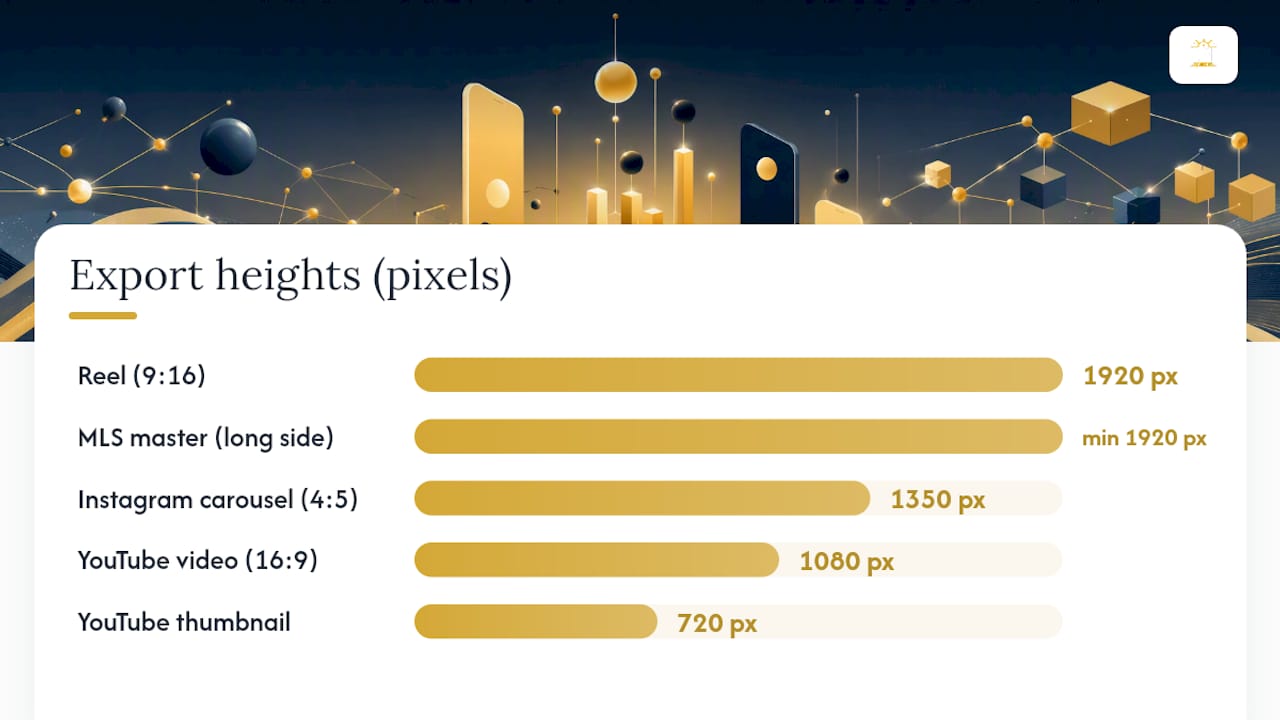
- MLS master: Export listing photos as high-quality JPG, minimum 1920 px on the long side, sRGB, under 10 MB per image. Check the MLS photo size and format requirements for BC realtors before submitting — REBGV and FVREB have specific pixel minimums and file-size caps.
- Instagram carousel: Crop the best 8–10 images to 1080×1350 px, 4:5 from the MLS master. Keep the property's most compelling feature (kitchen, view, living room) in the central safe zone.
- Instagram / TikTok Reel: Export the cinematic walkthrough video at 1080×1920 px, 9:16. If the original footage was shot in 16:9, reframe in post rather than simply cropping — the composition needs to work vertically. See the Instagram Reels strategy for realtors guide for framing and pacing tips.
- YouTube listing video: Export the full walkthrough at 1920×1080 px, 16:9. Create a custom thumbnail at 1280×720 px with the property exterior, address, and your branding within the central safe zone.
- Profile and branding: Keep your headshot and logo within the central circle-safe zone on all profile images. For cover photos, use the 1584×396 px LinkedIn spec or 820×312 px Facebook spec, and keep your contact details in the central 60% of the frame.
On a 9:16 Reel, that means your branding should sit between roughly 1350 px and 1600 px from the top of the frame.
Pro Tip: Keep a high-resolution original (RAW or high-quality JPG at 300 dpi) for every listing shoot. Platform specs change, and having the original means you can regenerate social exports at any future spec without returning to the property. Archive by address and date.
Readysetsoldmedia delivers all listing media MLS-ready and social-ready from a single booking, with exports sized for Instagram, Facebook, TikTok, and YouTube included in every package. With over $300 million in property value captured across the Lower Mainland, the workflow above reflects what actually gets listings in front of buyers.
Why vertical-first formats are the only rational choice in 2026
The shift to vertical is not a trend. It is a structural change in how people hold their phones, how platforms surface content, and how attention is allocated in a feed.
When Instagram launched in 2010, square 1:1 was the default because it was a clean, neutral format that worked on the desktop web. The assumption was that content would be viewed on a screen held horizontally or propped on a desk. That assumption has been wrong for years. The average person holds their phone vertically for the overwhelming majority of their screen time, and platforms have redesigned their entire feed architectures around that reality. TikTok was built vertical from day one and forced every other platform to follow.
You are not just losing aesthetic impact — you are losing the physical area of the screen that the viewer's eye has to engage with before scrolling past. That is a structural disadvantage, not a stylistic preference.
What surprises most creators is how much this matters for real estate content specifically. A property exterior shot in 16:9 looks cinematic on a desktop browser. On a mobile feed, it is a small rectangle surrounded by white space, competing with full-screen vertical content on either side. The same shot reframed to 4:5 or 9:16 fills the screen and gives the viewer time to register the property before their thumb moves.
The counterargument is that landscape formats are still correct for YouTube and LinkedIn, and that is true. The point is not to abandon 16:9 — it is to stop treating it as the default and start treating vertical as the starting point, with landscape as the deliberate exception for platforms that require it.
Platform-ready listing media from Readysetsoldmedia
Realtors across the Lower Mainland spend real time reformatting listing photos and videos for each platform after the shoot. Readysetsoldmedia eliminates that step. Every listing package includes MLS-ready photography and cinematic listing video exported at the correct dimensions for Instagram, Facebook, TikTok, and YouTube — no resizing, no guesswork, no quality loss from double compression.
The team shoots with social distribution in mind from the first frame: vertical compositions for Reels and TikTok, 16:9 masters for YouTube walkthroughs, and portrait crops for Instagram carousels. Branding elements are placed within platform safe zones so your contact details survive every crop. With fast turnaround and a full suite of media services built specifically for BC realtors, you get one booking that covers every format your listing needs. Book your listing media package and receive platform-ready exports with every shoot.
Sources
The specs in this guide reflect platform documentation and leading industry references as of 2026. Platform specifications change without notice — bookmark the official sources below and check them before any major campaign or listing launch.
Official platform documentation:
- Social Media Image Sizes in 2026: Guide for 9 Major Networks
- Social Media Image Sizes: Complete Guide by Network (2026)
- Best practices for aspect ratios across placements
- Social Media Aspect Ratios: Complete Guide for Every Platform (2026)
- Aspect Ratio Cheat Sheet: All Common Ratios and Sizes - Aspect Ratio Tool
- TikTok Video Size Guide: Best Dimensions for 2026 - Riverside
High-quality reference guides used to compile this article:
This guide is versioned for 2026. Specs are verified against official platform documentation and leading industry references. When a platform updates its requirements, the official help centre is always the authoritative source. Check official docs for any breaking spec changes before publishing at scale.